Why Custom Vector Art Conversion Services Matter for Professional Printing
Learn why custom vector art conversion services support professional printing with scalable graphics, clean paths, accurate colors, editable files, and better consistency.
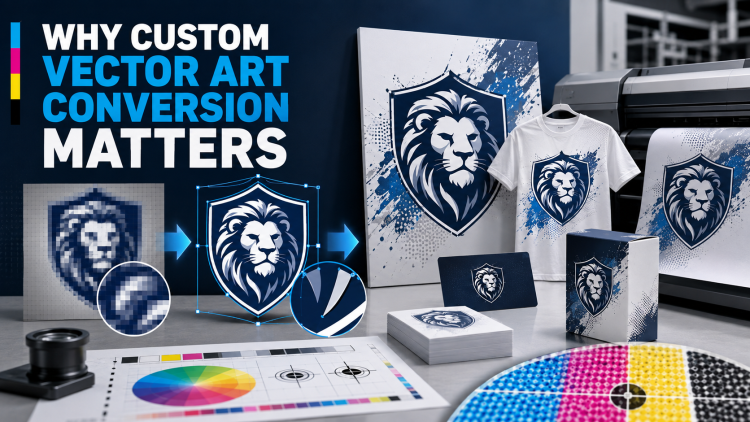
Professional printing requires artwork that can maintain clarity, accurate proportions, and consistent colors across different sizes and materials. A low-resolution JPG or PNG may look acceptable on a small screen but can become blurry or pixelated when enlarged for banners, signs, packaging, apparel, labels, and promotional products. custom vector art conversion services help transform existing artwork into scalable vector graphics that can be adjusted for different printing requirements.


Vector conversion is not simply changing a file extension. A professional conversion process involves rebuilding artwork with paths, curves, shapes, colors, and other editable elements. This allows the resulting design to be resized and modified while maintaining its visual structure.
For businesses that use the same logo or graphic across multiple print applications, having a properly prepared vector master file can simplify future production and improve brand consistency.
What Is Custom Vector Art Conversion?
Custom vector art conversion is the process of recreating raster or other artwork as vector-based graphics.
A source design may be available as a JPG, PNG, scanned image, screenshot, or another low-resolution format. A vector artist uses that artwork as a reference and rebuilds the design using paths and shapes.
Common vector output formats include AI, EPS, SVG, PDF, and CDR.
The exact format required depends on the intended printing method, software, or production provider.
Why Raster Artwork Can Be Difficult to Print at Large Sizes
Raster images consist of pixels.
When a small raster logo is enlarged significantly, the available pixels are stretched across a larger area. This can result in blurry edges, jagged curves, and loss of detail.
Increasing the image dimensions does not automatically recreate accurate design information.
Vector conversion addresses the problem by reconstructing the artwork as scalable paths.
1. Scalable Artwork for Multiple Print Sizes
One of the most useful characteristics of vector artwork is scalability.
A properly created vector logo can be used at a small size for a business card and enlarged for a large sign without the same pixelation associated with low-resolution raster artwork.
This gives businesses greater flexibility when adapting their branding for different materials.
Instead of recreating the logo for every new size, the vector master can be adjusted according to the project.
2. Cleaner Curves and Edges
Professional printing benefits from clean artwork.
Low-resolution raster files may contain jagged edges that become more noticeable when enlarged.
During vector conversion, curves and outlines can be recreated using carefully positioned anchor points.
This produces smoother shapes and more controlled edges.
Accurate curves are particularly important for logos containing circles, rounded lettering, icons, and geometric designs.
3. Better Logo Reproduction
Business logos often appear across many marketing materials.
They may be printed on stationery, packaging, signs, uniforms, promotional products, labels, and advertisements.
If the only available logo is a small raster image, using it consistently can be difficult.
A professionally converted vector logo provides a flexible master file that can be adapted for different print sizes and applications.
4. Improved Control Over Colors
Vector artwork allows colors to be separated into editable design elements.
This can make it easier to review and adjust colors according to brand specifications and printing requirements.
Businesses can provide Pantone references, CMYK values, RGB values, or brand guidelines when available.
However, the final printed appearance can still vary based on the printer, ink, paper, fabric, substrate, and production process.
For color-sensitive projects, reviewing a proof remains important.
5. Editable Design Elements
A properly created vector file can contain separate editable shapes and paths.
This allows designers to modify individual elements without rebuilding the entire logo.
Colors, outlines, shapes, and other components can be adjusted as needed.
This flexibility can be especially useful when a business updates its branding or creates different versions of a logo for specific applications.
6. Multiple File Formats for Different Applications
Different printers and production systems may request different file types.
AI, EPS, SVG, PDF, and CDR are commonly used vector formats.
A custom conversion provider can prepare the artwork in the format required by the project.
For example, one file may be needed for a commercial printer while another may be useful for digital production or cutting equipment.
Maintaining several appropriate formats can make future artwork management easier.
7. Better Support for Large-Format Printing
Large-format applications include banners, signs, displays, vehicle graphics, and other oversized materials.
These projects can require artwork to be enlarged significantly.
A low-resolution raster logo may lose clarity at these dimensions.
Vector artwork can be scaled to large sizes while maintaining smooth paths.
This makes vector conversion useful for businesses that need consistent branding across both small and large printed materials.
Custom Vector Conversion for Packaging
Packaging often requires precise artwork placement and consistent branding.
A business may use the same logo across boxes, bags, labels, containers, and promotional packaging.
A vector master file can be resized and adjusted for each package while maintaining the original logo structure.
Individual design elements can also be modified when packaging dimensions change.
Custom Vector Conversion for Apparel
Apparel printing can involve different production methods, including screen printing, heat transfer, vinyl cutting, and other techniques.
Each process may have specific artwork requirements.
A clean vector master can be adapted for the appropriate production method.
Additional preparation may still be necessary depending on the printer or equipment being used.
Custom Vector Conversion for Signs and Displays
Signs often require large, highly visible graphics.
A logo that looks acceptable in a small digital format may not perform well when enlarged.
Vector artwork provides a scalable source that can be adapted for signs, displays, banners, and other large graphics.
Clean paths also help maintain smooth edges when the artwork is reproduced at large dimensions.
Custom Vector Conversion for Promotional Products
Businesses frequently place logos on mugs, bags, pens, notebooks, stickers, displays, and other promotional products.
These products can vary significantly in size and production method.
A vector master file provides a flexible source for adapting the logo to different specifications.
The final production file may need additional adjustments based on the specific product and printing process.
Why Manual Vector Conversion Can Be Valuable
Automatic tracing tools can convert some simple artwork quickly, but they may produce unnecessary anchor points, uneven curves, overlapping shapes, or inaccurate details.
Manual vector conversion allows the artist to review the design more carefully.
The artist can recreate important curves, typography, proportions, and color areas according to the original artwork.
For complex business logos, manual cleanup can make a significant difference in the usability of the final file.
Importance of Typography in Vector Conversion
Text is often one of the most important parts of a business logo.
A low-resolution image may make the exact font difficult to identify.
The vector artist may need to locate the correct font or recreate the lettering as vector shapes.
Spacing, alignment, letter proportions, and curves should be checked carefully.
Small typography differences can change the appearance of a brand logo, so accuracy should be prioritized.
Maintaining Logo Proportions
A professional conversion should preserve the intended proportions of the original logo.
Circles should remain circular, lettering should retain its intended proportions, and symbols should maintain their correct relationship with surrounding elements.
Distorted shapes can create an inconsistent brand appearance.
Using grids, alignment tools, measurements, and carefully constructed vector paths can help maintain accuracy.
What Information Should You Provide?
Businesses can make the conversion process easier by providing complete information.
Useful materials include:
- Highest-quality original artwork
- Brand color specifications
- Font information
- Desired output formats
- Intended printing method
- Required dimensions
- Brand guidelines
- Any elements that must remain unchanged
The more accurate the reference information, the easier it is to reproduce the intended design.
Common Mistakes When Ordering Vector Conversion
One common mistake is providing only a small screenshot when a higher-quality original exists.
Another is failing to explain how the artwork will be used.
A logo intended for a large sign may require different preparation from one used on a small label.
Businesses may also accept an automatically traced file without checking the paths, typography, and proportions.
Reviewing the actual vector artwork before production can prevent avoidable problems.
How to Check a Converted Vector File
After receiving the file, open it in compatible vector software.
Zoom into curves, corners, lettering, and color boundaries.
Check whether individual objects can be selected and edited.
Make sure there are no unwanted background elements or embedded raster images if a fully vector file was requested.
Also verify the dimensions and colors against the original brand specifications.
Why a Vector Master File Is a Long-Term Business Asset
A professionally converted vector logo can be reused for many future projects.
Instead of repeatedly converting a low-resolution logo, a business can work from the same master artwork.
This can save time and help maintain consistent proportions, typography, and colors across different materials.
The master file can also be adapted when new products or marketing materials are introduced.
How to Choose a Reliable Vector Art Provider
Review previous examples before selecting a service.
Look for clean curves, accurate typography, correct proportions, organized paths, and good color handling.
Ask which file formats are included and whether the artwork will be fully editable.
It is also useful to ask about revision policies and whether the provider can follow specific printer requirements.
A reliable provider should understand both graphic design and the practical needs of production.
Conclusion
Custom Vector Art Conversion Services matter for professional printing because they help transform low-resolution or unsuitable artwork into scalable, editable, and better-structured vector graphics. Clean paths, accurate curves, controlled colors, flexible formats, and proper logo proportions can make artwork easier to adapt across different print applications.
A professionally prepared vector master can support business cards, packaging, signs, banners, apparel, labels, promotional products, and other branding materials.
iDigitize provides custom vector art conversion for logos and graphics, helping businesses prepare scalable artwork with clean paths, editable elements, and suitable file formats for different production needs.
Frequently Asked Questions
Q1. What is custom vector art conversion?
It is the process of recreating existing artwork as vector graphics using paths, curves, shapes, and editable design elements.
Q2. Can a JPG be converted into vector artwork?
Yes. A JPG can be used as a reference for recreating the design as vector artwork.
Q3. Why is vector artwork useful for printing?
Vector graphics can be scaled to different sizes while maintaining smooth paths, making them useful for many professional printing applications.
Q4. Is enlarging a JPG the same as vector conversion?
No. Enlarging a JPG increases its dimensions but does not create editable vector paths or eliminate the underlying pixel structure.
Q5. Which vector formats are commonly used?
AI, EPS, SVG, PDF, and CDR are common vector formats. The appropriate format depends on the production requirements.
Q6. Can vector conversion improve a business logo?
Yes. Professional conversion can recreate cleaner paths, smoother curves, accurate proportions, editable elements, and better-controlled colors.
Q7. What should I provide for vector art conversion?
Provide the highest-quality original artwork available, brand colors, font information, desired formats, dimensions, intended use, and any specific production instructions.
What's Your Reaction?